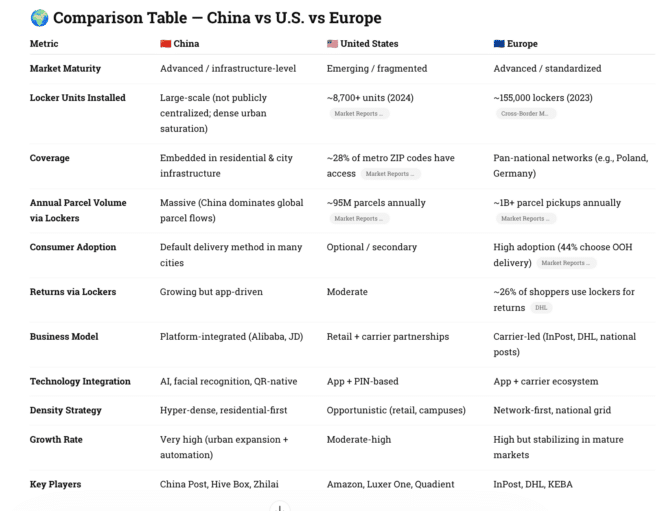
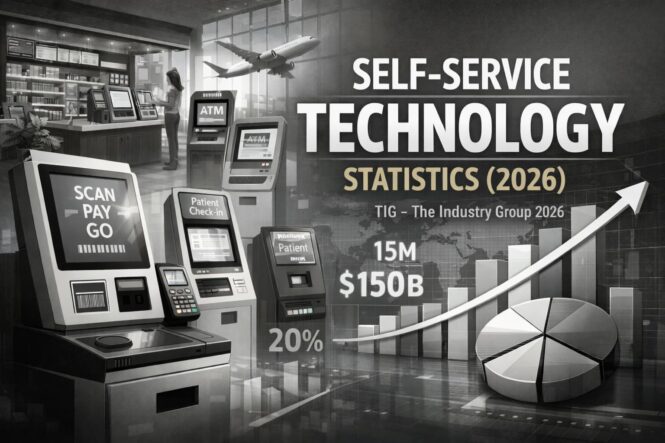
Servers have changed. Broadcom buying VMware didn’t help.
Broadcom’s acquisition of VMware has radically reshaped VMware’s business model and its relationship with customers. VMware has been refocused on a smaller set of core bundles—primarily VMware Cloud Foundation and VMware vSphere Foundation—sold only as subscriptions, with perpetual licenses and many standalone SKUs retired. Prices for many customers, especially SMBs and service providers, have risen sharply, and Broadcom has tightened its partner program so only selected, high‑revenue partners can resell VMware, pushing a lot of smaller customers to evaluate alternatives. On top of that, Broadcom has divested end‑user computing and some security products such as Horizon, Workspace ONE, and Carbon Black, forcing customers who relied on VMware for VDI and endpoint management to rethink their EUC and security stacks.
The result is strong revenue and margin performance for Broadcom, but significant backlash and churn risk as organizations reassess their dependence on VMware.
Citrix, meanwhile, has been affected more indirectly—both by Broadcom’s moves and by its own private‑equity ownership. With Horizon spun out of VMware, Citrix has positioned itself as the “safe harbor” for EUC, actively targeting Horizon customers and emphasizing its ability to run atop multiple hypervisors (VMware, Hyper‑V, Nutanix AHV, etc.) so customers are less exposed to Broadcom’s licensing strategy underneath. At the same time, some in the community see Citrix’s PE‑driven pricing and licensing simplifications as moving in a smaller‑scale version of the same direction—higher renewals, tighter packaging—and worry that Broadcom’s VMware playbook could become a template for further consolidation in the EUC/virtualization space. The net effect is that Broadcom has introduced a lot of instability into the VMware ecosystem while creating new opportunity and some anxiety for Citrix, which is trying to capture VMware EUC refugees without being perceived as the next vendor to pull a Broadcom‑style reset.
AI is driving more hardware‑intensive, GPU‑centric deployments on both cloud and on‑prem, which is reshaping but not replacing the traditional virtualized server market.
-
MSPs and hosting providers: Many of them are actively testing or rolling out alternatives such as Nutanix AHV, Hyper‑V, OpenStack, or vendor‑specific stacks (e.g., Acronis’s Cyber Frame) to avoid Broadcom’s new partner and licensing constraints.
And then — What AI is doing to server demand
-
Overall server demand is up: AI workloads (training and inference) are a major reason the server market is still growing, even when some “classic” enterprise workloads flatten or move to SaaS.
-
Dedicated AI servers are exploding: estimates put the AI server segment growing at 30–35%+ CAGR through the 2030s, from tens of billions in 2023 toward several hundred billion or more in annual value.
-
Hyperscalers are leading: most of the volume for AI‑optimized servers (GPU boxes, custom accelerators) is going to cloud providers, who then expose that capacity via managed AI services rather than raw VMs.
Effects on virtualization architectures
-
Less “generic VM everywhere” for AI: serious AI training tends to land on bare‑metal or lightly virtualized GPU clusters, because classic hypervisors add overhead and don’t expose accelerators as efficiently.
-
More specialized stacks: instead of just vSphere/Hyper‑V, you see tightly integrated platforms (NVIDIA DGX, OEM AI servers, Kubernetes with GPU operators) tuned specifically for AI workloads.
-
Virtualization is shifting up‑stack: container orchestration (Kubernetes) and serverless platforms are increasingly the “virtualization” layer developers see for AI apps, even though they still run on virtualized or bare‑metal servers underneath.
Impact on classic virtualized server vendors
-
Pressure on general‑purpose hypervisors: a growing share of new spend is going to AI‑optimized cloud and hardware instead of traditional VM farms, which challenges vendors like VMware and Citrix to stay relevant for new workloads.
-
Integration with AI ecosystems: OEMs (Dell, HPE, Lenovo) and cloud providers are pushing “AI factories” or reference architectures that combine GPUs, storage, and orchestration rather than just selling more hypervisor licenses.
-
Workload bifurcation: many orgs keep line‑of‑business and infra workloads on traditional VMs, while AI and analytics move to distinct clusters or cloud services, reducing the share of “everything on one virtualized platform.”
Where virtualization still grows
-
Edge and smaller AI workloads: inference at the edge or modest models inside enterprises still run happily on virtualized infrastructure (often with a few GPUs per host) managed by vSphere, Hyper‑V, or KVM.
-
Management and support tooling: as AI stacks get more complex, there’s renewed interest in automation, observability, and capacity‑management tools, regardless of whether the underlying is VMs or bare metal.
From LinkedIn — Just completed witness testing at our Wisconsin facility on two X90 480v 3 phase UPS units. We have the capability to deliver a 700kVA unit in less than two weeks, which is exceptional in today’s market. If your project is facing delays due to lead times, we are here to assist.
UPS Requirements for AI-Optimized
AI‑optimized servers draw dramatically more power than traditional virtualized servers: think roughly 0.3–0.5 kW per “normal” server vs around 2 kW per AI server, and 8–15 kW per traditional rack vs 30–80+ kW per AI rack. For expert advice talk to Steve at Xtreme Power — https://www.linkedin.com/in/steve-lipnisky-216475a/
Per‑server ballpark numbers
-
Traditional virtualized server (CPU‑only):
-
Typical average: about 300–500 W per 1U/2U server under load.
-
Peak can be higher (600–800 W) but nameplate is usually under 1 kW for standard dual‑socket boxes.
-
-
AI / GPU server:
-
Typical average: around 2 kW per server is a common planning number.
-
High‑end boxes with 8 GPUs (H100/B100‑class) can realistically sit in the 3–5 kW range per chassis under training load, depending on config and cooling.
-
Per‑rack power density
-
Traditional virtualized racks:
-
Historically 5–10 kW per rack, with many modern enterprise racks in the 8–15 kW range as CPUs and storage density increased.
-
That aligns with maybe 20–40 mid‑range servers at a few hundred watts each.
-
-
AI‑optimized/GPU racks:
-
Common planning ranges now are 30–80 kW per rack for dense AI workloads.
-
Some cutting‑edge designs and roadmaps talk about 100 kW+ per rack for next‑gen AI clusters, which is an order of magnitude above classic enterprise racks.
-
What this means for power and cooling
-
Power and distribution:
-
Data centers built for 5–10 kW/rack need major electrical upgrades (higher‑capacity PDUs, busways, and feeds) to host 30–80 kW AI racks safely.
-
Facility‑wide, a single AI hall can add tens of megawatts of load, pushing campuses toward 100+ MW total when you add existing IT plus cooling overhead.
-
-
Cooling:
-
Traditional air‑cooled setups can usually cope up to around 15–20 kW/rack before efficiency and noise get ugly.
-
AI racks often push operators toward liquid cooling (rear‑door heat exchangers, direct‑to‑chip, or immersion) to handle sustained 30–80 kW densities.
-
More Power Equals More Heat which Equals More Cooling
Here is calculator for cooling and how close you are to liquid cooling for server racks — https://thinclient.org/thermal.html#/
When does the rack tip from air to liquid — and what does it cost to follow it there?
Model the operational shift from air to liquid cooling as rack density climbs. The calculator surfaces cooling-energy savings, UPS capacity headroom, threshold bands where each cooling architecture remains viable, and the break-even point across your investment horizon.
Addendum – Does Citrix Support AI
What Citrix Offers Around LLMs
-
Citrix Aidrien in-product assistant
-
Citrix Aidrien is an AI-powered assistant built into Citrix Cloud, available from the main console and within services like Citrix DaaS and NetScaler Console.
-
It uses a large language model combined with Citrix documentation, KBs, community content, and telemetry from your own environment (session data, NetScaler status, config, etc.) to answer admin questions in natural language and provide diagnostic guidance.
-
Aidrien is currently in public preview (launched Nov 2025) with GA targeted for around Q2 2026.
-
-
LLM-aware NetScaler AI Gateway
-
Citrix has introduced a NetScaler AI Gateway designed specifically to manage and govern traffic to large language model and AI services, similar to how an API gateway manages REST/RPC calls.
-
It provides centralized control and governance for AI/LLM calls from enterprise applications, extending NetScaler’s security and traffic management to AI workloads.
-
Third-party security tools (e.g., Protecto for LLM privacy/security) are already integrating with NetScaler AI Gateway, indicating an ecosystem around LLM governance.
-
-
Support for GPU/AI workloads in virtual environments
-
Citrix (via its virtual app/desktop stack) works with NVIDIA RTX virtual workstations to support AI workloads, model development, and other GPU-intensive tasks in virtualized environments.
-
This lets orgs host AI/ML tooling and potentially LLM-related workflows in Citrix-delivered desktops or workstations, with the usual Citrix security and delivery model.
-
How This Translates Practically
-
If you are an admin:
-
You can use Aidrien in Citrix Cloud to query your environment in natural language (e.g., “Why are logon times slow in region X?”) and get LLM-generated, context-aware guidance; Aidrien won’t auto-remediate, but will suggest diagnostic steps and fixes.
-
-
If you are building LLM apps:
-
You can front-end your LLM endpoints (OpenAI, Azure OpenAI, internal models, etc.) with NetScaler AI Gateway to get authentication, rate limiting, logging, and governance over AI/LLM traffic.
-
-
If you need AI compute in Citrix sessions:
-
You can provision GPU-backed virtual workstations (Citrix + NVIDIA RTX) and run AI dev tools or inference workloads inside a Citrix-delivered desktop.
-
Practical Answer for Healthcare Teams
-
Local LLM inference can support HIPAA requirements when:
-
PHI never leaves your controlled, compliant environment; all components (including Citrix, hypervisors, storage, and monitoring) sit inside your HIPAA risk boundary.
-
Every vendor that could see ePHI (including via logs) signs a BAA, and you enforce encryption, RBAC, audit logs, and retention controls.
-
-
But Citrix alone does not guarantee compliance
-
Using Citrix/NetScaler for AI or local inference does not, by itself, “satisfy HIPAA”; regulators will look at your architecture, contracts, and documented controls, not just product labels.
-
You should treat an LLM deployment like any other regulated system: do a HIPAA security risk assessment, classify data (PHI vs de‑identified), and start with low‑risk use cases (e.g., policy search, internal summarization) before exposing full PHI.
-











 IGEL Technology baut seine führende Position auf dem internationalen